Welltherm · knowledge & inspiration
Welltherm infrared panel under a desk: work comfortably
13 January 2026 · Welltherm Netherlands / HeatXL
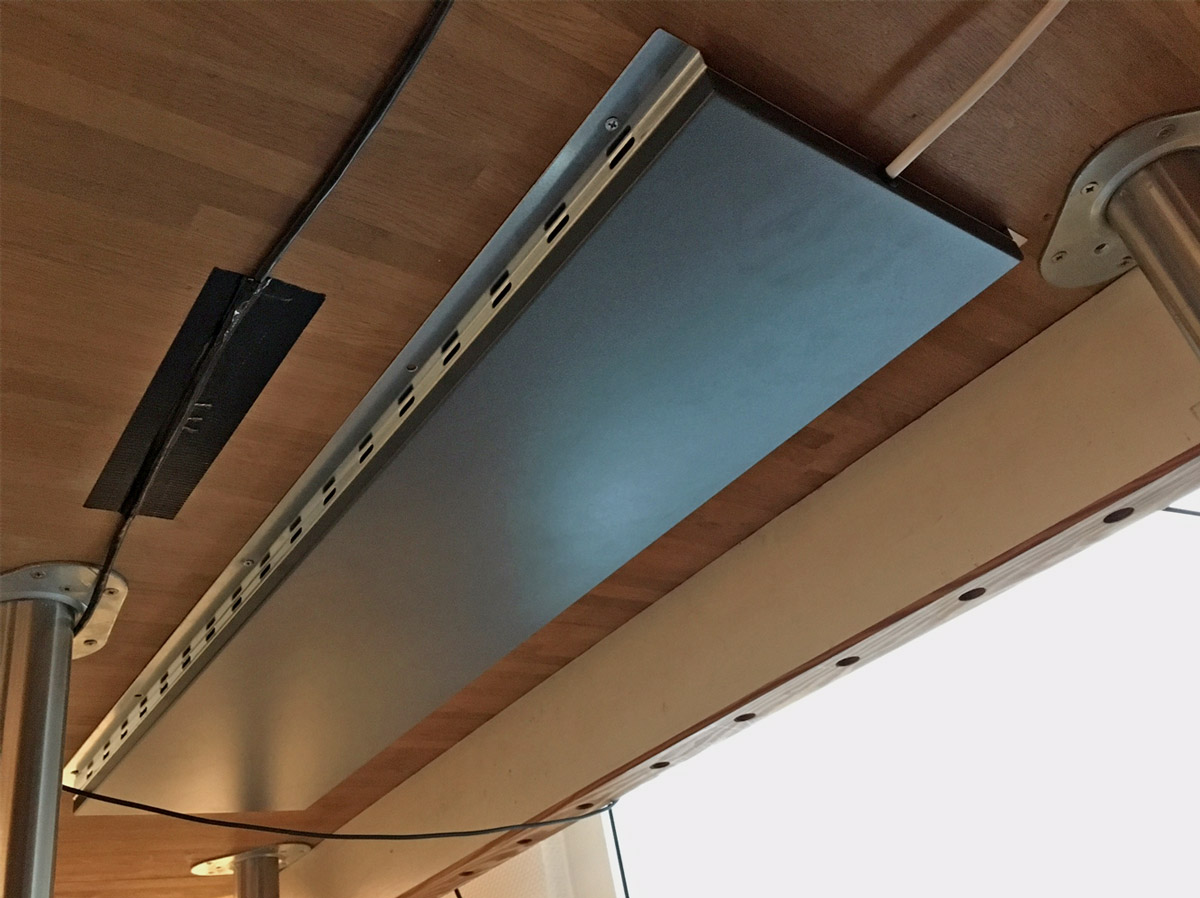
This guide explains what matters when choosing a Welltherm infrared panel under a desk. The temperature in your study seems fine, but beneath the desktop it remains chilly. During a long working day, you especially notice your legs and feet could use extra warmth. A Welltherm infrared panel under a desk adds targeted warmth where you sit without placing a freestanding heater on the floor.
Our ST0100 desk heating was developed for this application. The compact metal panel mounts beneath the desk and has an output of 100 watts. Its continuously adjustable inline dimmer adapts warmth to your preference. This article explains what the solution does, when it suits your workstation and how to assess mounting, controls and consumption. We also discuss the difference between personal supplementary heating and heating an entire office space.
Key points to consider
- A desk panel provides local supplementary heating; it does not automatically replace study heating.
- Welltherm ST0100 in the 2026 catalogue has 100 watts, dimensions of 30 × 60 cm and a continuously adjustable inline dimmer.
- Check beforehand that the desk underside provides enough space for the panel, fixings and prescribed clearances.
- Calculate electricity costs using output, actual operating time and your own electricity tariff.
- Adapt warmth to your sitting posture and use; for multiple workstations, choose an approach including general room heating too.
Why the workstation beneath your desk may feel different
A thermostat measures temperature at one location in the room. This does not explain everything you experience while sitting. A cold floor, window beside the workstation or draught near a door may create a cooler sensation. Distance from the existing radiator and layouts with cupboards or drawer units also matter. You may consequently want extra warmth while others already find the room pleasant.
Start with the cause of discomfort. Addressing a gap beside the window may be worthwhile, as may a better desk position. Consider the floor and general room heating too. Targeted desk heating is particularly relevant when the study is at a usable temperature but you want more comfort at the seating position. A persistently cold, uninsulated space requires broader assessment.
Comfort around legs and feet during seated work
When sitting at a computer for long periods, you move differently from walking or doing household work. You may notice chilly surroundings near your legs and feet sooner. An extra jumper does not always make that difference pleasant. A panel beneath the desktop can add warmth to that occupied zone while keeping the work surface free for your screen, keyboard and documents.
The objective is a more pleasant workstation, not medical treatment. We therefore do not attach guarantees about circulation, health or productivity to desk heating. Comfort remains personal. What feels pleasant to one user may be too warm for another. Adjusting warmth with the dimmer is consequently a practical part of ST0100.
Read more
Perceived warmth depends on distance, sitting posture and the layout beneath the desk. Mounting position must therefore match where your legs normally are. We consider not only desktop dimensions but also drawer units, cable trays and crossbars. An unobstructed radiant area makes purposeful panel use easier.
Use targeted warmth without promising fixed savings
A Welltherm infrared panel under a desk lets you use supplementary warmth while working there. This may appeal when one person needs extra comfort. It is not automatically a saving, however: the panel consumes electricity. The effect on total energy consumption depends on what you do with existing heating and how long supplementary heating operates.
If lowering general heating settings, assess whether the rest of the room remains comfortable and suitable for use. Other occupants matter too. A 100-watt desk panel is not intended to bring a cold study independently to temperature. It helps heat a personal zone; the building’s heating demand remains alongside it.
A simple trial with your own use provides more insight than a general savings percentage. Record when you work, dimmer settings and how the room is heated. Where possible, compare energy consumption under similar conditions. Our infrared heating consumption and costs page explains converting output and operating duration into electricity use.
How does a Welltherm infrared panel under a desk work?
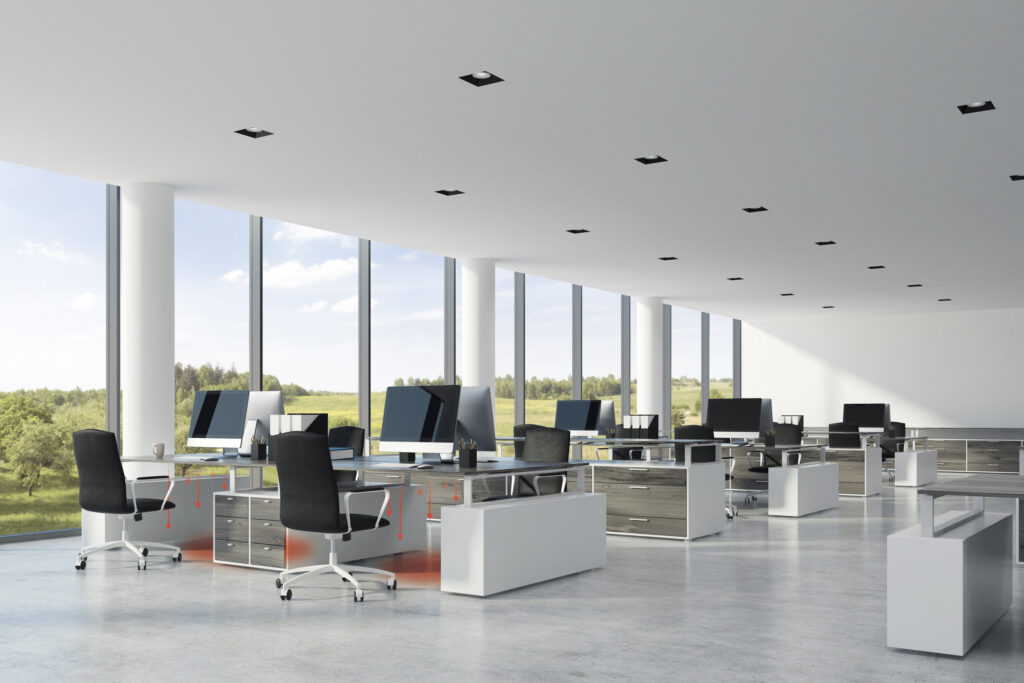
The panel converts electrical energy into heat and emits part of it as radiant warmth. People and surfaces within the radiant area absorb that warmth. Heated surfaces then release warmth to their surroundings too. Both targeted radiation and workstation conditions therefore influence comfort. Do not confuse this principle with a fan blowing warm air beneath the desk.
Positioning the heat source close to the occupied zone adds supplementary heating without needing a large wall panel. However, this requires a product designed for under-desk mounting. A standard wall panel may have different surface temperatures, mounting requirements and necessary clearances. Low wattage alone does not prove an appliance suitable for this application.
ST0100: compact metal panel with inline dimmer
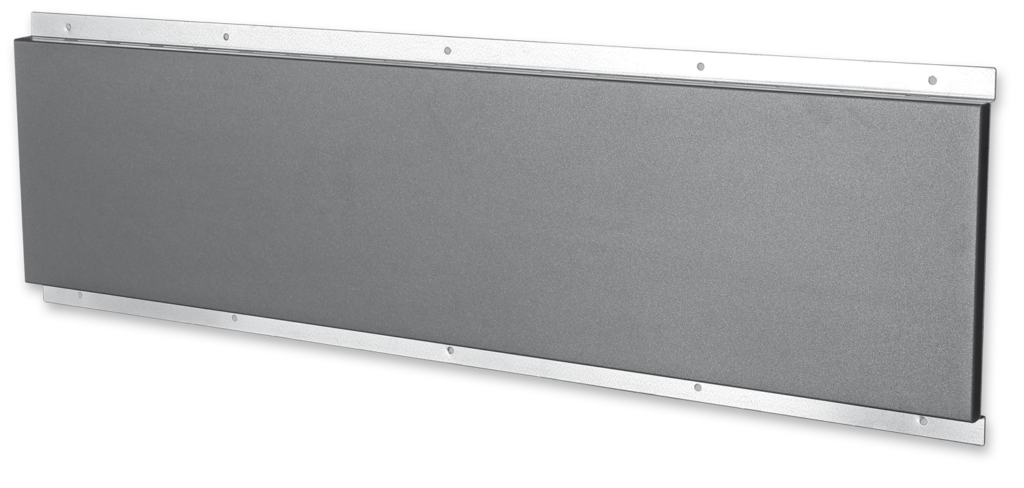
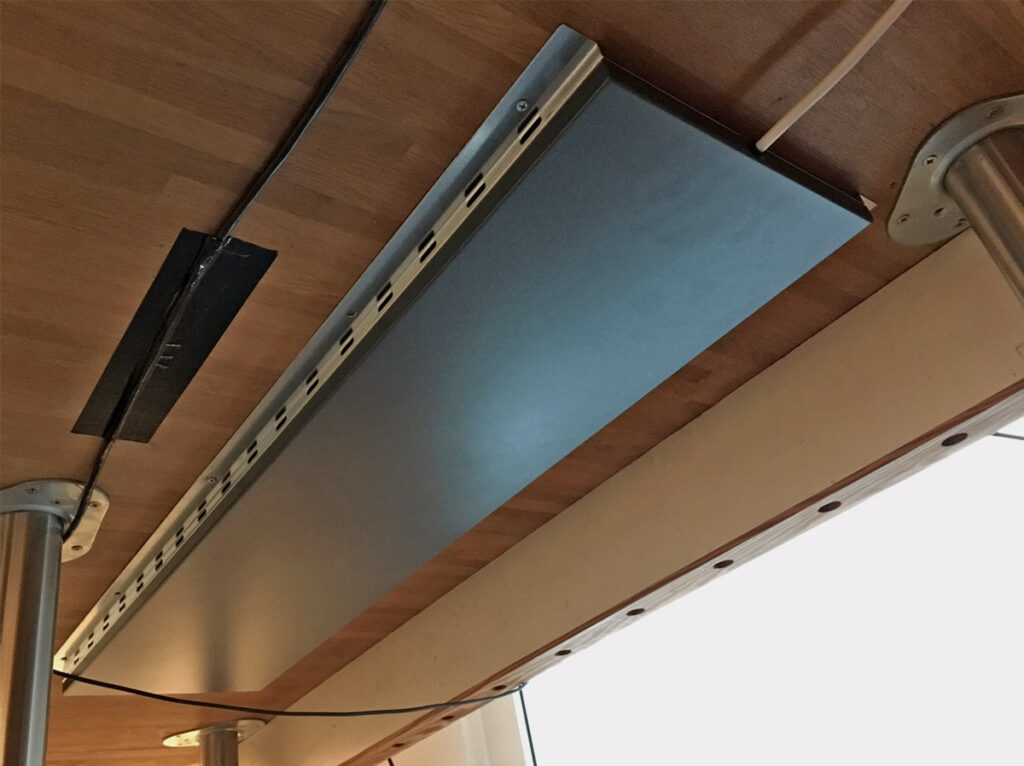
Welltherm ST0100 in the 2026 product catalogue has a metal front with a fine textured finish in anthracite grey, RAL 7016. Dimensions are 30 × 60 cm, output is 100 watts and weight is 3.8 kg. Its heating technology is ESHC Plus. The connection comprises an 1850 mm cord with Schuko plug and continuously adjustable inline dimmer.
The inline dimmer adapts the heat setting to your preference. It does not automatically measure room temperature. If you want additional controls or a particular switching method, discuss which components fit this version. Our Welltherm desk heating product information provides the current version and selection details.
Read more
These details help assess the application beforehand. Measure the available position beneath the desktop and check that the structure can support the panel using correct fixings. Also consider where the dimmer remains accessible. Colour is usually less decisive beneath a desk than on a wall, but compact positioning can keep the workstation tidy.
A warm surface requires correct use
Even a desk panel with limited output becomes warm. Follow operating instructions for positioning, clearances and permitted applications. Ensure papers, bags, clothing and cables do not cover the heating surface. An under-desk panel is not a footrest or a place to rest objects against. Keep the area around the appliance clear.
The current ST0100 has an IP21 protection rating and electrical protection class I. An earthed connection point and suitable operating environment therefore form part of preparation. This desk heating is intended for a suitable workstation; do not automatically use it in a humid environment or as outdoor heating. Ask for advice if unsure whether the room and connection fit.
Read more
Check space in different sitting postures. Your knees must move freely and the chair must not touch the heating. Consider visitors, children or pets that may enter beneath the desk too. The right solution is determined by both product and operating environment. Referring only to a brand name is insufficient to declare every mounting position suitable.
Compare desk heating: which solution suits your workstation?
Extra warmth beneath a desk can be experienced in different ways. A heated mat, for example, focuses on foot contact. An infrared panel emits warmth from its mounted position beneath the desktop. An appliance heating the entire study serves another purpose again. Compare application first, then price, output and dimensions.
If you mainly want your feet on a warm surface, assess different features from those relevant to supplementary warmth around legs and feet. Consider freedom of movement, controls and changing posture. No solution is best for every user at every desk. The selected technology must fit your workstation and expectations.
Fixed mounting as part of your daily workstation
For a permanent home workstation or your own office desk, under-desktop mounting may be logical. The panel receives a fixed position, with no loose appliance in circulation routes. ST0100 was developed for fixing beneath a desk. Nevertheless, check space beside cable trays and the frame, and whether prescribed mounting is practicable.
Read more
Fixed positioning also makes neat cord routing and dimmer accessibility easier. You need not reposition the heat source for every working day. Still include workstation changes. A new drawer unit, different chair or relocated desk may change available space and radiant area.
Use the fixing method prescribed for the product. Welltherm desk heating is not a self-adhesive mat to stick beneath a desktop at your discretion. Weight and the warm surface require appropriate fixings. A thin, hollow or specially finished desktop may require structural advice before mounting.
Shared desks and mobile solutions require another assessment
At a shared workstation, several people use the same desk. A panel can form a permanent workstation provision if layout and controls suit users. A dimmer allows warmth to be adjusted to preference. Agree who switches off the appliance and how space beneath the desk remains clear.
If regularly working at different tables, a permanently mounted ST0100 is not automatically the most convenient solution. Do not use the appliance loose on the floor when that application is not permitted. Discuss options suited to changing workstations instead. Selection depends on movement frequency, available space and possible mounting at the workstation.
In an office, personal supplementary heating can also coexist with general room heating. One employee may want more warmth than another while the building installation provides the background. We then consider a coordinated approach rather than each desk independently. Explore our infrared heating for workstations and businesses solutions for broader possibilities.
Mounting and positioning beneath the desk
Before installation, take time to examine the desk underside. Measure clear area and note frame components. Also allow for normal chair and leg positions. A panel whose dimensions fit beneath the desktop may still be poorly positioned if a crossbar or drawer unit obstructs intended mounting.
Then consult your version’s manual. It specifies mounting conditions and how to fix the appliance. Current documentation is available on our downloads page. Identify article number ST0100 in enquiries so we use information for the right product. Older versions or data do not automatically apply to the current model.
Choose a mounting position with room to move
Choose a permitted position suited to the zone you want to warm additionally. Assess sitting upright, moving your chair back and repositioning your legs. Heating must emit warmth without unnecessarily restricting movement. Do not adopt a general distance from an arbitrary internet guide; follow the specific panel’s requirements.
Read more
Also check the quality of the material receiving fixings. A solid desktop, thin board and table with a metal frame may require different fixing choices. Fixings must support the panel reliably and match the manual. If unsure, have the situation assessed before drilling holes or buying fixing materials.
Route the cable so chair wheels, drawers or frame cannot trap it. Do not leave it hanging in a circulation route. The dimmer must remain accessible without repeatedly searching between warm components or cables. Neat cable routing makes daily use more practical and helps keep the desk underside clear.
Controls at ordinary and sit-stand desks
Start with a setting matching your preference and distance, adjusting as needed. Switch off heating when leaving the workstation. The continuously adjustable inline dimmer controls heat level but does not automatically switch off when you stand up. Make switching off part of your work routine, such as finishing work or taking a longer break.
Read more
A sit-stand desk requires additional attention to cable routing. The desktop moves and distance to the socket changes. Check the complete movement without the cord becoming taut or trapped. Mechanism components beneath the desktop may also move. Assess whether mounting is permitted for that specific desk and retains enough clearance.
Do not expect an under-desktop panel to provide exactly the same comfort standing as sitting. Leg position and distance change. Using a sit-stand desk is therefore a reason to discuss the application beforehand. You can choose an arrangement matching your working day rather than deciding solely by dimensions.
Benefits of Welltherm desk heating at your workstation
Targeted desk heating can be a practical addition when you mainly want extra warmth beneath the desktop. ST0100 combines that application with a compact metal panel and its own inline dimmer. You retain desk surface for work and decide when to use supplementary heating. Its value lies in an appropriate application, not a general promise that every workstation improves identically.
Welltherm develops and manufactures infrared panels in Lüdenscheid, Germany. HeatXL supports you in the Benelux with product advice and quotations. We therefore help with both appliance selection and workstation questions. Mounting or changes to an electrical installation may require a competent installer. Discuss that work according to the situation on site.
Calculate consumption and combine with room heating
Make consumption of a Welltherm infrared panel under a desk understandable with a simple calculation. At 100 watts, electrical output is 0.1 kilowatts. Four hours of continuous operation at nominal output equals 0.4 kWh; eight hours equals 0.8 kWh. Multiply kilowatt-hours by your energy contract tariff to determine electricity costs.
At an example tariff of €0.30 per kWh, four hours of continuous use costs €0.12 and eight hours €0.24. This is a calculation example, not a current standard tariff or guaranteed daily price. A lower dimmer setting or shorter operating time may change consumption. Total heating costs also include existing room heating during the same period.
Read more
If you have solar panels, heating may use some electricity during generation. This does not mean enough self-generated electricity is available every working day. Production and heating demand often differ considerably in winter. Assess actual use and your tariffs rather than routinely treating desk heating as free or fully covered by solar electricity.
A considered choice for one desk or several workstations
For a home workstation, advice starts with desk dimensions, its underside layout and your comfort preference. For an office with several workstations, we also include occupancy, general heating and electrical provision. Ten ST0100 panels, for example, have a combined nominal output of 1000 watts. Suitable connections and distribution must be assessed alongside other equipment.
At purchase, also ask about warranty conditions and support for the particular version. A quality label or warranty for another product series must not simply be attached to desk heating. Our warranty and service page provides more information. For ST0100 advice, request a proposal for your workstation.
Read more
A trial arrangement at one suitable workstation may help before equipping a whole office. Assess space beneath the desk, dimmer accessibility and user experience. Agree clearly about switching on, switching off and keeping the panel clear. For an organisation, consistent application is often more useful than merely counting appliances.
Make your workstation more comfortable with targeted warmth
A Welltherm infrared panel under a desk is intended for extra comfort where you work. Current ST0100 provides 100 watts, a compact metal version and a continuously adjustable inline dimmer. Suitable mounting and correct use add supplementary heating without a freestanding floor appliance. Existing room heating and the building remain part of overall comfort.
Want to know whether this solution suits your desk? Provide dimensions and desk type, optionally adding an underside photograph. Also state whether it concerns one home workstation, a sit-stand desk or several office positions. Contact HeatXL or request a quotation. We help with product selection and considerations for your arrangement.
Frequently asked questions about a Welltherm infrared panel under a desk
Can I use ST0100 close to my legs?
The appliance was developed for desk heating, but mounting and clearances must comply with operating instructions. Its surface becomes warm. Ensure your legs move freely and prevent clothing, bags or other belongings covering the panel. Assess available space in normal sitting posture and when moving the chair.
How much electricity does Welltherm ST0100 use?
Nominal output is 100 watts. One hour of continuous operation at that output equals 0.1 kWh. At an example tariff of €0.30 per kWh, this is €0.03 per hour. Actual costs depend on electricity tariff, duration and dimmer setting. Include general room heating too when comparing total consumption.
Can I stick this infrared panel beneath the desk?
Use the mounting method in the manual. ST0100 is not a self-adhesive heating mat. The panel weighs 3.8 kg and must be mounted with appropriate fixings beneath a suitable structure. Do not substitute your own adhesive solution for prescribed fixings. Ask for advice if unsure whether your desktop is suitable.
Does heating warm the desktop?
Desk heating construction and mounting are intended for use beneath the desktop. Correct clearances and fixings nevertheless remain necessary. Do not assume a universal temperature limit or guarantee against damage to every material. Follow current documentation and have an unusual or sensitive desktop structure assessed beforehand.
Do I need a separate thermostat or dimmer?
ST0100 in the 2026 catalogue already has a continuously adjustable inline dimmer. This manually adjusts the heat setting. It differs from automatic control by room temperature. For additional operation, discuss compatibility and permitted application. Not every accessory for other Welltherm panels automatically fits this desk heating.
How does it differ from a fan heater beneath my desk?
A fan heater moves heated air; a desk panel emits radiant warmth from its mounted position. Compare desired use, output, positioning and available space. ST0100 targets personal supplementary heating. Choose according to your comfort preference and check how the appliance may be used at the workstation.
Does the panel suit a sit-stand desk?
That depends on your desk’s construction, mounting conditions and cable route. Check that enough clearance remains during adjustment and the cord neither becomes taut nor trapped. Perceived warmth may differ when standing. Discuss the desk and use before mounting.
How long does Welltherm desk heating last?
Lifespan is influenced by use, surroundings and maintenance. Consult product information, warranty conditions and available support for your ST0100. Follow cleaning instructions and periodically check cables, fixings and controls. Keep article and purchase details so we can help specifically with service enquiries.