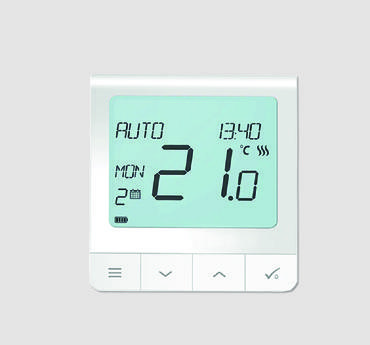
Welltherm · ZigBee 3.0 · 2.4 GHz
SA wireless controls
Explore the available Welltherm range, prices and ordering options. Opens in a new tab.
The Welltherm SA thermostat controls temperature with a suitable surface-mounted receiver via ZigBee 3.0. Choose a set or separate components with the correct connection variant. We match the measurement position, operation and receiver to your room and panels.
We help you choose the right version and associated components. HeatXL provides Welltherm advice and supply in the Benelux.
A proposal that suits your project
Tell us where you want to use this product and how the space or installation is arranged. We coordinate the version, connection and any controls with you. You receive a personal quotation with the price and supply options.
Current range
Welltherm SA Wireless Controls
A wireless thermostat and surface-mounted receiver for a suitable installation. Select the set or separate components.
| Article | Version | Power output | Dimensions | Weight | Quotation |
|---|---|---|---|---|---|
| SA00050 | Thermostat set with SA00010 | — | — | — | Choose SA00050 |
| SA00010 | Surface-mounted receiver | — | — | — | Choose SA00010 |
| SA00050-01 | Set with open connection | — | — | — | Choose SA00050-01 |
| SA00010-01 | Receiver; 500 mm GST15i3 and open connection | — | — | — | Choose SA00010-01 |
| SA00020 | Table stand | — | — | — | Choose SA00020 |
- Protocol
- ZigBee 3.0, 2.4 GHz
- Thermostat
- IP30; setting range +5 to +35 °C
- Receiver
- IP54; maximum 10 A
- App control
- Not in this configuration
Connection and application: SA components use ZigBee 3.0. Do not combine with DE based solely on plug shape.
An SA combination for your space
Choose beforehand which panels should respond together to one heat demand. We match the total connected output, receiver and connection. The thermostat measures temperature at a suitable place in the room; the surface-mounted receiver switches the connected heating.
The SA range uses its own communication protocol and has no app control in the offered system. ZigBee in other equipment does not itself confirm that equipment works with this thermostat set. For an extension, we check the specific model combination. Provide a photo and article codes of existing components.
After installation, have confirmation that the thermostat and correct receiver are paired and all intended panels respond. Keep the controls and any connection points accessible according to installation requirements. We include the required components in your proposal; use the supplied SA version’s instructions for pairing and operation. To prepare, you can choose thermostats and zone heating, or combine the panel, connection and controls.
What you control with a Welltherm SA thermostat
A Welltherm SA thermostat and receiver form a control combination for compatible electric heating panels. The thermostat measures temperature at the chosen position. The receiver operates the connected heating when the setting demands it. This configuration allows operation to be selected according to the room’s daily use, while the appliances’ connections are prepared separately.
The SA range uses ZigBee 3.0 at 2.4 GHz. These are this control range’s connection details. They do not mean the offered thermostat set operates via Wi-Fi or automatically works with every other ZigBee device. The current catalogue states no app control for this SA configuration. Anyone specifically seeking remote operation discusses that preference before selecting products instead of adding an arbitrary gateway later.
Read more
Start with one clearly defined heating zone. Describe which panels should respond together and how the room is used. A home workspace with fixed working hours has a different practical task from a bathroom used mainly in the morning. Choose settings based on that task. A jointly controlled group must also have a measurement position that sufficiently represents the relevant space.
Choosing the set, receiver and connection variant
SA00050 is the thermostat set with the matching SA00010 surface-mounted receiver. The -01 variants have a specific connection with a 500-millimetre GST15i3 connection and open connection. The table distinguishes the set and separate receiver. This allows the right components to be selected for a first installation or assessed extension. A set name alone does not provide a complete picture of the existing cable route and connected output.
The SA receiver is rated up to a maximum of 10 A. Have the output of all connected panels, electrical supply and protection assessed together. The maximum is not a recommendation to load a receiver to its limit without further checks. Mounting space, ambient temperature and connection method also form part of that assessment. An installer uses the specific version’s instructions for this.
DE and SA are different systems. DE uses X3D and SA uses ZigBee. Similar-looking connections or the presence of the same connector do not change that distinction. For an extension, we therefore first check which range is already present. Provide the model codes of both thermostat and receiver, because a front photo alone may provide insufficient information to establish the combination.
Position the sensor according to the space in use
For useful control, the sensor must be in a representative position. Consider sunlight, windows, draughts and local heat sources. A sensor beside a warm appliance may register a high temperature sooner than the workplace where you seek comfort. A position directly in a cold airflow can instead produce a different heat demand. Use the prescribed mounting position and discuss unusual conditions beforehand.
SA00020 is the table stand within the offered range. A table stand can make the controls practically accessible, but does not justify continually changing the measurement position. Choose an agreed location and keep it the same during normal use. This makes a changed setting easier to assess. If the sensor stands on a different piece of furniture every day, control and measurement conditions change simultaneously.
The thermostat has IP30 and the receiver IP54. These classifications belong to different components. The adjustable temperature is not a range for every permitted installation environment. In the catalogue, the thermostat has a setting range of +5 to +35 °C; the receiver has its own operating requirements. In a bathroom or other special space, have each component’s position assessed, including the connection point and panels.
Connecting, pairing and checking
The professional prepares the electrical connection for the selected SA version. Keep the receiver accessible within product requirements so checks and maintenance remain possible. Avoid hiding the connection behind fixed furniture without including it in the plan. The connector system simplifies compatible connections, but does not remove the assessment of cable routes, switching load and mounting position.
Read more
After registering the components, operation is checked. Temporarily change the heat demand and see whether only the intended panels respond. Then check switching off and restore the normal setting. For several zones, perform this test room by room. This provides clarity before residents or staff rely on the installation during ordinary use.
Record the combination with article codes and room names. Also keep the manuals supplied with the components. A later receiver enquiry then does not require rediscovering which panel belongs to which controls. A clear components list also helps when a room is renovated or a thermostat receives a different measurement position.
Daily operation and heating expectations
A change on the thermostat creates a control instruction; it does not immediately warm the panel and room. How the space responds depends on its starting temperature, heat loss and available capacity. Therefore match the desired setting to actual use. A considerably cooled room may need preparation before comfortable occupancy is possible.
For electricity consumption, the time the panels actually heat matters. A set period and electrical operating time are different details. To track usage, record settings and, where appropriate, use a suitable meter. Read our explanation of consumption to compare power, hours of use and your own electricity tariff consistently.
Read more
Discuss with users how the normal setting is chosen and when a temporary adjustment is reversed. Relevant functions follow from the supplied SA version and associated manual. We do not supplement those functions with general promises about apps or other devices. Operation therefore remains based on what the selected combination actually supports.
Preparing a suitable SA enquiry
Send the panel numbers, outputs and photos of mounting positions. Describe the existing connection and who uses the room. For an existing installation, we also request receiver details. This lets us determine the suitable combination and which new components are required. You receive a proposal keeping the thermostat, receiver and connection variant together.
HeatXL is the Welltherm distributor for the Benelux and helps with product selection and support. Visit HeatXL or explore available components in the infraroodpaneel.nl online shop (Opens in a new tab). Request a complete combination when comparing the final installation; the separate price of a controller says little about the required receiver and connection.
For installation and operation, use your supplied set’s instructions. During selection, we also confirm how the SA components apply to the panels. Further preparation is available under thermostats for infrared heating and precon and controls. The right choice makes everyday operation understandable and keeps any extension linked to the same recorded details.