Welltherm · X3D · 868 MHz
DE wireless controls
Explore the available Welltherm range, prices and ordering options. Opens in a new tab.
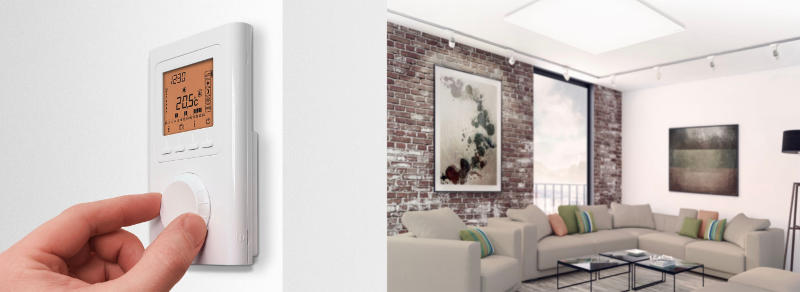
The Welltherm DE thermostat controls your panels with a weekly programme and compatible X3D receivers. Choose the connection variant that suits your installation. For app control, we also select the appropriate gateway and system combination.
We help you choose the right version and associated components. HeatXL provides Welltherm advice and supply in the Benelux.
A proposal that suits your project
Tell us where you want to use this product and how the space or installation is arranged. We coordinate the version, connection and any controls with you. You receive a personal quotation with the price and supply options.
Current range
Welltherm DE Wireless Controls
A premium thermostat with a weekly programme and compatible receivers. App control is possible with the correct router and system combination.
| Article | Version | Power output | Dimensions | Weight | Quotation |
|---|---|---|---|---|---|
| DE00050 | Set: DE00000 + DE00010 | — | — | — | Choose DE00050 |
| DE00000 | Premium wireless thermostat | — | — | — | Choose DE00000 |
| DE00010 | Surface-mounted receiver | — | — | — | Choose DE00010 |
| DE00050-01 | Set with open connection | — | — | — | Choose DE00050-01 |
| DE00010-01 | Receiver; 500 mm GST15i3 and open connection | — | — | — | Choose DE00010-01 |
| DE00050-11 | Set with Schuko connection | — | — | — | Choose DE00050-11 |
| DE00010-11 | Receiver; 500 mm GST15i3 and 1800 mm Schuko | — | — | — | Choose DE00010-11 |
| DE00001 | Basic thermostat; router required for programming | — | 8,1 × 8,1 × 2,2 cm | — | Choose DE00001 |
| DE00011 | Plug-in receiver 10 A / 230 V | — | 14,0 × 7,2 × 7,3 cm | — | Choose DE00011 |
| DE00012 | Recessed receiver 10 A / 230 V | — | 5,0 × 4,7 × 3,3 cm | — | Choose DE00012 |
| DE00020 | Router for smart home operation | — | 10,0 × 10,0 × 2,6 cm | — | Choose DE00020 |
| DE00021 | Door/window opening sensor | — | 10,0 × 2,6 × 2,6 cm | — | Choose DE00021 |
| DE00022 | Floor sensor for recessed receiver | — | 3.8 × Ø 0.6 cm; 3 m cable | — | Choose DE00022 |
- Protocol
- X3D, 868 MHz
- Thermostat
- IP30; setting range +5 to +30 °C
- Premium surface-mounted receiver
- IPX4, maximum 16 A; for other receivers, see version
- App control
- Possible with compatible additional equipment
Connection and application: DE components use X3D. Choose the receiver and connection for your panel.
Putting your DE controls into operation
A good start consists of three elements: having the receiver electrically connected, pairing the thermostat and receiver, then matching the programme to your usage. The DE pairing manual describes registering receivers. Then check whether each paired receiver responds to a changed heat demand. Use the manual for your version on our downloads page.
With premium DE controls, AUTO mode follows the configured daily programme. Comfort and reduced-temperature periods can be chosen for each day. A temporary Party setting or absence period is useful when your day differs from the normal schedule. After testing, restore the desired operating mode; a fixed Comfort mode does not follow a weekly programme.
For DE controls, a compatible opening sensor can be paired with the receiver. With the relevant function enabled, the described DE combination switches to frost protection when a window opens. App control requires a compatible gateway and system combination. A DE receiver receives heating instructions via X3D; a Wi-Fi network alone does not replace that combination.
The consumption display of the described premium DE thermostat requires entering the power of paired heating elements. Use this display as an aid to monitor the controls. For actually measured electricity and cost comparison, choose a suitable energy meter. For an extension, provide current model codes and settings so total connected power is processed correctly. To prepare, you can combine the panel, connection and controls.
A Welltherm DE thermostat as part of the system
A Welltherm DE thermostat clearly distinguishes between room controls and switching the heating. You set the desired temperature on the thermostat. The matching receiver processes heat demand and operates the connected panels. This allows you to choose the measurement position based on the space while making the electrical connection at another suitable location. That division is convenient when you want the controls by an entrance and the panel on the opposite side of the room.
DE communicates via X3D at 868 MHz. This protocol describes the wireless connection between control components; it is not built-in Wi-Fi in the infrared panel. A plug that fits mechanically also does not prove protocol compatibility. We select the components as a coherent combination. This clarifies beforehand which receiver belongs to the thermostat and which connection suits the chosen Welltherm panel.
Read more
Product selection starts with what must be controlled. Note the panel number, output and connection for each room. State whether existing heating remains and whether all panels in that room should respond together. One thermostat can usefully control a shared zone only when its measurement position represents that zone. A bathroom and study with different usage times therefore do not automatically receive the same programme.
Compare premium, basic and the compatible receiver
DE00000 is the premium thermostat within this range. DE00050 combines the thermostat with surface-mounted receiver DE00010. Connection variants with suffixes -01 and -11 have their own cable configurations. Choose such a suffix based on the electrical installation. The difference is not merely another product name: open cable ends and a Schuko connection require different preparation and components.
DE00001 is a basic thermostat for which the catalogue specifies additional router equipment for programming. This differs from the premium version with its own weekly programme. Therefore compare everyday functions before selecting a set. Someone with fixed work and home schedules considers the programme and temporary adjustments, for example. Anyone seeking remote operation includes the necessary gateway and connection in the proposal immediately.
DE00011 and DE00012 are other receiver versions with a stated load of 10 A. The premium surface-mounted receiver has a maximum of 16 A. These values must not be generalised to every receiver. Add the connected appliances’ outputs and have the complete power supply assessed. This includes the receiver, wiring, protection and simultaneous use; simply comparing panel wattage with a limit is not a complete installation check.
Define precon and cable choices beforehand
With the current connection, precon makes linking compatible components straightforward. The DE00010-01 version has a 500-millimetre connection with GST15i3 and an open connection. The -11 version combines the GST15i3 connection with an 1800-millimetre Schuko cable. State where the connection point is and how much route is actually needed. The shortest distance on a floor plan is not always the cable route along a wall or behind the finish.
Read more
Have a professional perform a fixed connection or work on open cable ends. Reserve an accessible position for the receiver according to product instructions. A compatible connector does not replace assessment of the installation environment and electrical load. In a bathroom, each component is also assessed separately for its permitted position: the panel’s protection rating does not automatically apply to the thermostat, receiver and connection point.
If you have an older installation with a mains plug on the panel, mention that explicitly. Send a photo of the actual connection and rating plate. We check the available combination for your existing situation; you do not need to convert an old product designation into a new suffix yourself. Keep the confirmed components list with the installation so a later extension can use the same details.
Choose a measurement position that represents your room
The sensor must be able to follow conditions in the occupied space. Direct sunlight, a cold airflow, a warm wall or immediate influence from the panel can change the measurement. The easiest place to put the thermostat is therefore not automatically the right one. Consider the measurement position when the room is actually used and observe the supplied controls’ installation conditions.
Read more
Portable controls require an agreed fixed measurement position. If the thermostat lies on a sunny table during work and is placed beside a window in the evening, measurement conditions also change. Therefore define one representative position. Operation can remain simple, but the sensor is not a personal warmth meter carried in a jacket pocket to make the installation respond from any location.
With several panels, test every intended receiver after pairing. Temporarily raise the set heat demand and check which appliances respond; then lower the setting and check switching off. Afterwards restore the normal operating mode. A room-by-room check prevents a swapped receiver being noticed only when two rooms use different programmes.
Use the weekly programme clearly
The programme becomes useful when it matches an ordinary week. First note when the room is needed. Then distinguish comfort periods from times with a different setting. The panel and space have a warm-up time. Determine necessary preparation from your installation’s operation; the desired start of a comfort period is not automatically the moment a fully cooled room immediately becomes pleasant.
Read more
On an unusual day, a temporary adjustment may be more convenient than changing the entire weekly programme. Check how to return to automatic mode. A fixed Comfort setting and an automatic daily programme operate differently. Make controls clear for all users, for example with a short agreement about the normal mode and how a temporary setting is ended.
The consumption display of the described premium controls uses entered power data for paired heating. Keep those details updated when a panel is added or replaced. Such an indication helps monitor usage, but is not an independent kWh measurement of your complete installation. For an actual comparison with the energy contract, use a suitable energy meter and the same measurement period.
Consider app control and additional functions
For smartphone operation, the required gateway must suit the DE combination. The thermostat and receiver continue operating through their own system. Specify beforehand whether you want operation only at home or also from another location. Include the connection, user permissions and daily accessibility. A home Wi-Fi network alone does not replace the additional control equipment.
Read more
A compatible opening sensor can form part of the DE configuration. Its operation is linked to the intended receiver and settings. After installation, check what happens when the relevant window opens and closes again. The sensor does not replace a ventilation plan; it enables a described control response. A frequently open window continues to affect room heat demand.
Also discuss local operation when the app is unavailable. Everyday heating must remain understandable for users present. Determine who may change settings and how another user recognises the normal operating mode. This is particularly relevant in an office, guest room or home where several people use the same heating programme.
Have your DE combination assembled
For a focused enquiry, we would like the number of rooms, panel codes and desired control functions. Add photos of existing control components. State whether a fixed connection, Schuko connection point or current precon combination is present. We include the compatible thermostat, receiver and any additional components together in the proposal. The price then depends on the specific selected combination.
Welltherm develops and manufactures the heating panels; HeatXL handles Benelux distribution and support. For available product choices, visit HeatXL. Retail prices for available components are at the infraroodpaneel.nl online shop (Opens in a new tab). For a complete installation, a components list and project proposal remain more useful than comparing only the price of a separate thermostat.
For pairing and programming, use the manual associated with the supplied version. The official DE thermostat manual and associated receiver documentation help prepare the installation. Also view our explanation of connections and controls. Record the final measurement position and zone layout so use, maintenance and later extensions follow one clear plan.